

Compare candidates
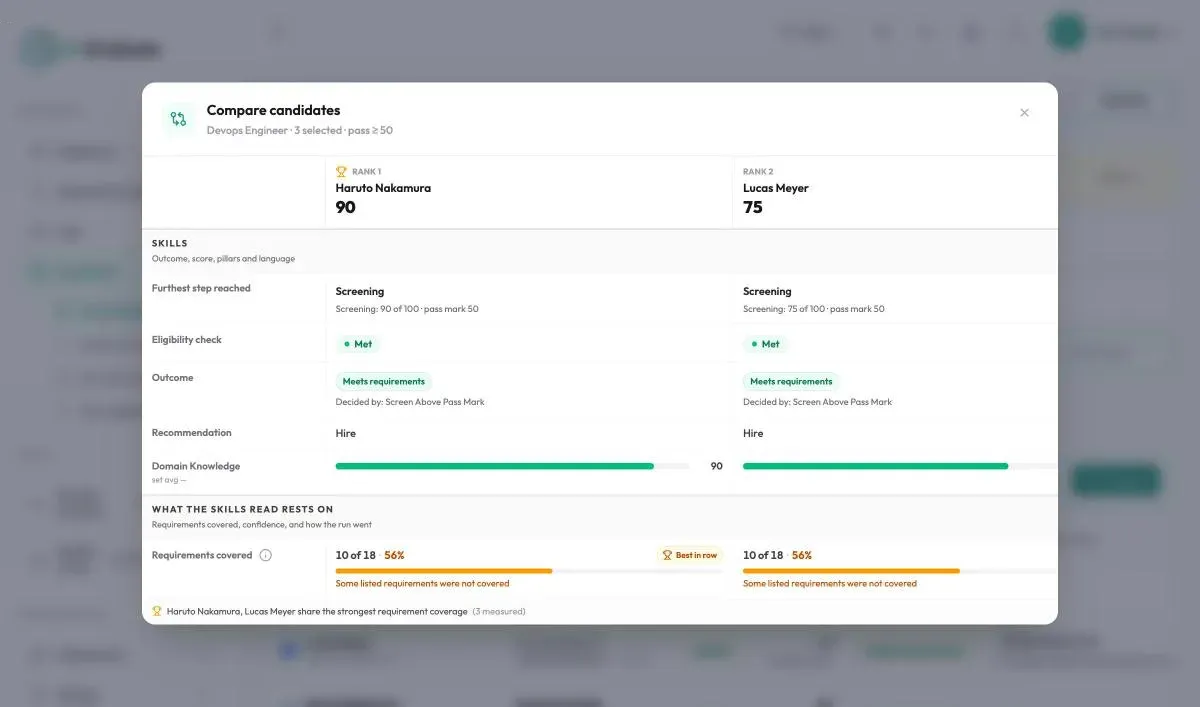
Compare candidates puts two or more finished candidates side by side, one column per candidate and one row per result.
Use case: three finalists scored within a few points of each other. The recruiter compares them to see who leads on the skill area the team needs most before choosing who to interview first.
- Open Candidates. To keep to one job, filter the list by that job.
- Tick two or more scored candidates from the same job. Candidates who are not scored yet cannot be picked.
- Select Compare. With more candidates than fit on the screen, scroll sideways to see the rest.
From a job’s results you can also select Compare top finalists.
What you see
Section titled “What you see”- In Compare from Candidates: each candidate’s rank and score, then rows grouped under Skills (furthest step reached, Eligibility check, outcome, recommendation and skill areas) and What the skills read rests on (requirements covered, with Best in row for the leader). Further groups cover integrity, working with AI, motivation and salary fit.
- On the comparison page from a job’s results: Rank n of total and the score out of 100, next to the pass mark; Summary, Levels, Skill areas and Working with AI for each candidate; and What we found, for candidates who passed, with how many requirements each one covered.
Candidates are compared on the same test. If some took the Screening only and others the Deep assessment, they are Shown in separate groups, because the two scores measure different things.
When a comparison can’t be shown
Section titled “When a comparison can’t be shown”- Pick at least two candidates: select two or more.
- These candidates are from different jobs (or All selected candidates must belong to the same job): a comparison works within one job.
- Someone here has not finished yet: leave out anyone still in progress.
- That is a few too many: choose fewer candidates.
A candidate can also show Not ranked, for example Waiting for a review or Stopped at an earlier step.
- Next: Job results
- Related: Candidate results, Candidates
- Need help? Email [email protected].