

Bulk hiring
Choose how your jobs assess candidates by default: the standard steps, or one short Screening test.
Bulk hiring gives every candidate one short test: Screening (20 questions, 10 minutes) instead of the Deep assessment. If the job has an Eligibility check, candidates still answer it first. Turn it off to bring the Deep assessment back; each job can follow this setting or choose its own.
Use case: a recruiter hiring 200 warehouse staff wants one quick test for everyone. She turns Bulk hiring on, so each new job gives one short Screening test instead of the Deep assessment. A law firm hiring two associates keeps it off and uses the full assessment.
Standard steps or Bulk hiring
Section titled “Standard steps or Bulk hiring”| Bulk hiring off (standard) | Bulk hiring on | |
|---|---|---|
| What candidates take | The standard steps, including the Deep assessment | One short test: Screening instead of the Deep assessment |
| Eligibility check | Answered first, if the job has one | Still answered first, if the job has one |
| Length | Depends on the job | Screening: 20 questions, 10 minutes |
| Best for | Specialist roles | Many candidates for the same role |
Before you start
Section titled “Before you start”Hiring in volume must be on for your organization. An organization admin turns it on in Organization and settings. It needs a paid plan with credits.
Turn on Bulk hiring for every job
Section titled “Turn on Bulk hiring for every job”- In the sidebar, under Assessments, select Assessment Config.
- In Assessment steps, find Bulk hiring.
- Switch it On. It saves straight away: Screening turns on and the Deep assessment turns off.
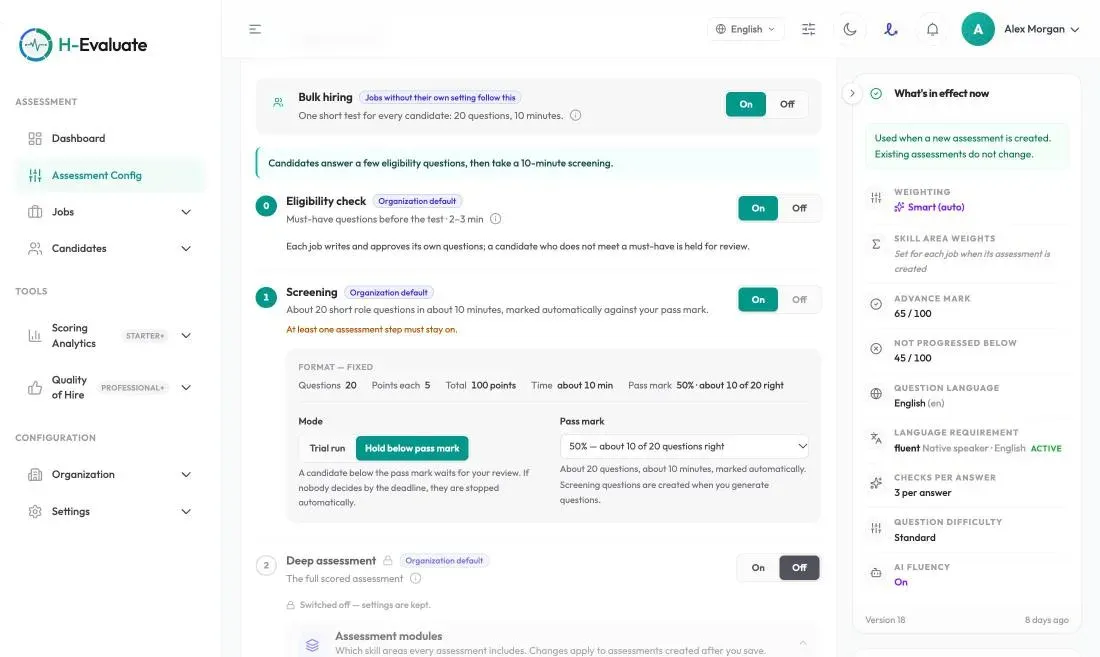
Jobs without their own setting follow this default. Turn it Off to bring the Deep assessment back.
- Have unsaved changes to the steps? Save or cancel them first, then use the switch.
- A job can choose for itself. On the job, the Bulk hiring switch has Use organization setting to follow this default. See Assessment configuration.
- The change applies to assessments created after you save. An assessment already created keeps its steps.
- If you see Bulk hiring is off. An organization admin can turn on Hiring in volume in the organization settings., ask your admin to turn on Hiring in volume first.
- On a Bulk hiring job, Screening is the final test: there is no Deep assessment after it. A score below the pass mark is marked for your review; nobody is rejected automatically.
- Next: Team and roles
- Related: Organization and settings, Assessment configuration
- Need help? Email [email protected].